.sidebar .widget {border-bottom: 1px solid #000000;}
Showing posts with label Photoshop Class. Show all posts

You Break Me Up!


Photo of four siblings to be used as example by Photoshop teacher
Before

"After" Photo of siblings seemingly broken by following Photoshop brush video tutorial
After
Learn to "break apart" a photo by creating your own brush settings. Make photos look as if they've been torn to shreds or cut into squares.  With a little manipulating, you could even create your own puzzle.

Here is the video to get you started:  School AccessPublic Access
Here is the photo to follow along, or you may use any photo you like:  Break Apart Photo

Board Book Remake with Photoshop


We have a beautiful little girl staying with us until her mother returns from deployment.  I decided to make a board book for the baby (she is still a baby, relatively speaking) with photos of her mother.  

Here is the first stage:  Creating the Pages in Photoshop

child's board book ready to be altered by Photoshop teacher
First I found a board book at the thrift store that had seen better days.  This one, 
in fact, was destined for the trash bin at the end of the week.
Board book remake in Photoshop: Room 626 Photoshop teacher Linda Miller measuring width of book
Next I measured the dimensions. 

Board book remake in Photoshop: Room 626 Photoshop teacher Linda Miller measuring height of book
It turned out that this one was exactly
six inches square.


Creating Professional Photo Pages

Professional Photo Album spread example for Room 626 Photoshop students
Professional Photo Album 2-page spread:  New Car
Want a project that will give you some "real life" experience in Photoshop as well as allow you to choose your own subject?  Then here it is:  Professional Photo Album Design.

Photoshop Elements

Adobe Photoshop Elements box


Did you know that Adobe makes a product similar to Photoshop, but more affordable?  It's called Photoshop Elements.  It's sort of like a combination of Photoshop and Lightroom, except instead of $600, it's under $100 (in fact, Amazon just dropped the price to $82.22.)

Also, Adobe offers a pay-as-you-go program as well.  Sort of like leasing Photoshop.

Lastly, there is a free program called Gimp, which is like Photoshop but offers way, way, WAY less tools and filters and all that good stuff.  But it's good for basic photo editing.

Student Showcase: Magazines

This was a fun optional project for students to just "play with Photoshop."

Magazine designed in Photoshop by Room 626 Photoshop student
Alexandria

Put Your Face on the Cover of a Magazine!


Ever wanted to be famous and appear on the cover of a magazine?  
Here's your chance! 

Challenge: Expand your skills!


In Photoshop 2nd semester this week, students will work on the Text Portrait Project.  I have set aside the entire week for this project, because of the level of difficulty and the number of videos that accompany it.  If you follow along with the videos using your own image, your success rate will be much higher than if you try to wing it.  This is true of all our assignments, but this one in particular is a little tricky. To see examples, go to this link:  Text Portraits

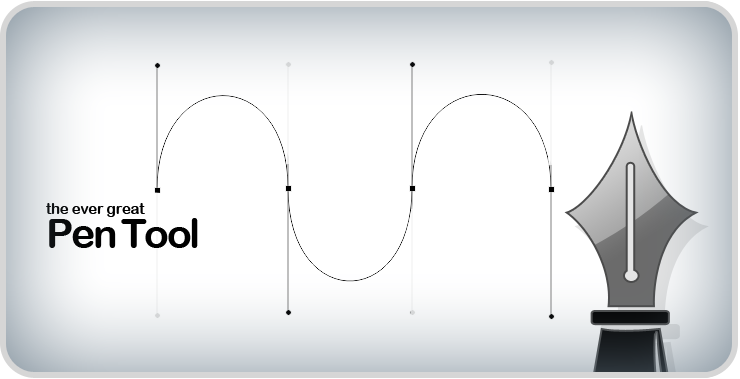
Conquering the Pen Tool: You'll learn to love it

The pen tool:  if you learn to use it correctly, you'll love it.

Here's a few projects to practice your skills.
Pen Tool Cup:  learning the tool
Pen Tool Parrot, a short project using the pen tool.
Text Portrait: a major project in which you will be creating a work of art.


Introducing the Pen Tool


The Pen Tool is an exciting tool that will really enhance your Photoshop skills.  It is, however, probably the hardest tool to master.

Da Font is a great site for fonts.  It's a bit bulky to go through, but once you find a font you like, you are able to type out a word or phrase to see if you really want to use it before downloading it.  I've downloaded a few from this site, but I've also just used it for taking a screenshot of the word or phrase I'm going to use, if it's just a one-time thing.

Layers Project Winners

Congratulations to the Layers Project Winners!  You all did an awesome job.

Kaylee B.

Folder Design Class Winners

Students in Photoshop are keeping a folder in which they will store their agenda, notes on shortcuts, common procedures, and their projects.  Students were required to "design" their covers with whatever means they wanted, then members of each class voted on a "class favorite."  Below are the winners for each class.  Great job, guys!

Course Fair Videos

Congratulations to the following students, whose videos were chosen to be shown at the 8th grade course fair:
Jordan Studdard, Shaynah Bibbee, Hunter Coronado, Amy K Fuquay, Haley Robling, Alex Meza, Audrey Morales, Kristy Olson, Eddie Rhind, Wade Smith, Gerrit Terrazas, Emily Winner and Emily Wood.  And a special "GONGRATS" to Emily Winner, whose video was chosen as the best overall.


Organizing Photos

There are a number of ways to go about organizing your photos.  I use a combination of iPhoto and Bridge.  I use Bridge for the most recent photos, and when I am finished editing them, I move them to iPhoto.

If you don't have a Mac, there is a free program called Picasa from Google Apps.  You can do a search to find it if you want.  I know several people who use this program for organizing their photos.

Whatever way you decide to organize your photos, you need to make sure you find a way to record the dates.  In iPhoto and Bridge, the date is added to the information automatically.  But just to make sure, I create separate folders for each date and store the photos there.


When I move them to iPhoto, I rename the folder to include the year and a subject name.


This is what works for me.  You have to find what works for you!

Extra Credit and Organizing Photos

As many of you know, I teach an adult Photoshop class twice a week.  I always ask my adult students why they have chosen to take the class.  Last semester's students were mostly photographers and their answers were to fix and enhance photos and to become better photographers.  I had to tell them that the former (fix and enhance photos) was definitely doable, but the latter (become better photographers) was a completely different class.  Photoshop will only help you become a better photographer after the photograph has been taken!

This semester's students also said to fix and enhance photos, but the majority of them also said "to learn how to better organize my photos."  I had to tell them that Photoshop was NOT going to help them organize their photos!  In many cases, it will make organization worse, because you may end up having several different versions of the same photograph.  There are some Google Apps available for this.  I will post more about them later.

Speaking of my night class, if you would like extra credit, there are some students who could benefit from a "helper" sitting next to them and just in general helping them keep up.  If you would like to do this, let me know!

Photoshop 2???

Want to take Photoshop 2?  Write it in!  It will be a "self study" course where you will be able to choose what you want to learn and create!