.sidebar .widget {border-bottom: 1px solid #000000;}

Tuesday, 10/16/12

Graphic Design: Beautifying Portraits (3 assignments)
2.  Content Aware Fill
3.  Puppet Warp
  • arm
  • Watch video, use the "arm" image to make the guy more muscular.

Adv. Graphic Design:  Continue either Anti-Bullying poster or Flow Chart Poster

Digital Media: 

2nd, 5th:  Learn how to laminate, then work on yesterday's review.
On Thursday, 6th and 7th will learn.

Everyone else:  Finish yesterday's review

Practice removing pimples:  pimple1, pimple2, pimple3

Monday, 10/15/12

Graphic Design:  Beautifying Portraits (3 assignments)
Learn to remove blemishes and smooth skin:

Blemish 1 Video
Pic
Blemish 2 Video
Pic
Upload finished jpegs as Blemish 1 and Blemish 2

Smoothing 1
Smoothing 2
Pic
Upload finished jpeg as Smoothing 


Adv. Graphic Design:  Bullying poster due Wednesday.
Next assignment, due Tuesday, 10/23/12:  Flow Chart Poster


Digital Media:  Today we're going back to real reviews.
Find your class period and the first initial of your name.  Download the game or app next to your name.
Play the game or use the app for 10-15 minutes before writing your review.
You will have two days to complete your review.
Your finished review should look very similar to the reviews you've been reading and reviewing.
Note:  I will be grading your reviews according to the format you used to Review the Reviews.

2nd
L:  Transfuse
J:  Dr. Panda's Hospital-Free        

4th
M: Dr. Panda's Hospital-Free
T:  Lie Detector Plus

5th:
R: Dr. Panda's Hospital-Free
D:  iCrime Fighter CV Lite
B:  iCrime Fighter CV Lite
E.  Dr. Panda's Hospital-Free


6th
B:  Lie Detector Plus
G:  iCrime Fighter CV Lite
Ju:  Lie Detector Plus 

7th
B:  iCrime Fighter CV Lite
N:  Lie Detector Plus
M:  iCrime Fighter CV Lite

Friday, 10/12/12

 
Graphic Design:  Ketchup day

Adv. Graphic Design:  Ketchup day

Digital Media: Ketchup day

Have a great weekend!

Thursday, 10/11/12

Graphic Design:  
Last day to work on collage

Adv. Graphic Design:
Tomorrow is last day to finish Halloween image.  After tomorrow, 10 points off per class period.

Digital Graphics:  
Finish Review of the Reviews;
Scanning

Wednesday, 10/10/12

Graphic Design:  
Finish Project
Adv. Graphic Design:
Continue working on Halloween or Anti-Bullying projects
Digital Graphics:  
Finish last Review of the Review


Extra:
Practice rotating, coloring and making and coloring titles:
Car 1
Car 2
Car 3
Car 4
Car 5
Car 6
Car 7
Car 8

Tuesday, 10/9/12

Graphic Design:  
Check out these images (2011 Gradient Mask Projects) from last year, then read about your next project below.

Gradient Mask Project:
  • What are you passionate about?  Band?  Music?  World peace?  A certain someone?  Find or take a minimum of 5 pictures that represent that passion and create a collage using the gradient mask technique you learned in the Gradient Mask tutorial.  
  • Add text to create a title for your collage.  Make sure to use capitalization in your title.
  • You will have 2 full class periods to work on this.
  • Note:  last year students were not required to use a title, but this year you are.

Adv. Graphic Design:
Make sure you finish and "publish" your Halloween image.  Send me an email, or post a comment below to let me know when you publish it.

Digital Graphics:  
Do one last review of the review using an app from this list.
Note:  you should have at least 3 Reviews of the Reviews.  Even if you are behind, please make sure you do 3 reviews before you move on to anything else.

Extra:
Practice rotating, coloring and making titles:
Car 1
Car 2
Car 3
Car 4
Car 5
Car 6
Car 7
Car 8

Monday, 10/8/12

Everyone must do this assignment:  Tag your posts
Yes, it's for a grade
Yes, I mean everyone (Photoshop 1 and 2 and Graphic Design)
After you tag one of your posts, come back to this page for the rest of the assignments.

Graphic Design (Photoshop 1):  More Working with Text
Note about last assignment:  Although I said you didn't have to use exactly the same text as I did, your text did have to look like mine, at least the size and the amount.  I have not graded the assignment yet, but if you only used "Hello" or something like that, you will not pass the assignment.  The purpose of the assignment was that you know how to fit text around an image. You still have some time if you want to delete that image and replace it with another.


More Working with Text
These next three videos will show you how to get more creative with text:
  • Clipped Text:  watch the video then find your own photo to do the same.  Don't just slap a word on the photo, make it creative!  Here's the Clipped Text video.
  • Text to Path: Open a new Photoshop file (use "default" Photoshop size) and follow along.  Here's the Text to Path video.
  • Warp Text:   Open a new Photoshop file(use "default" Photoshop size), type the word Hello, make it the size in the video, then follow along.  Here's the Warp Text video.

Adv. Graphic Design (Photoshop 2):
  • If you didn't get a chance to look at the poster design examples, go to the Resource link above.

Digital Graphics:  
  1. Finish your Review of the Review from Friday 
  2. Tag all your posts (this will make it easier for teachers to find reviews)
  3. Check for any scanning in your DIM box behind Mrs. Miller's desk.

Friday, 10/5/12, PS1 Voting Today for Fav Filmstrip Postcard!


Graphic Design:  
Learn to add text to an image.
You will need:
Entering Text File (this is a Photoshop file)
Entering Text Video 1
Entering Text Video 2
Upload your finished image to your blog.
Extra Credit:  Find an image, add a poem or part of a poem or part of a song's lyrics to the image (Example).

Adv. Graphic Design:  


Check out these saved image searches:
Anti-Bullying Poster Image Search  (you'll have to weed through them to get the good ones, but there are some very good ones.)
Poster Design Image Search (some really cool posters)

Digital Media: 
Do another review of the review using an app from this list.

Thursday, 10/4/12

Graphic Design:  
Gradient Mask
This is by far the most requested technique in Photoshop, and the one I am most often asked to review (as in, Mrs. Miller, how did we do that, you know, where we made a collage...?)  And my answer is "Go to the videos and files page."
But today, I am providing the link to the Gradient Mask Tutorial, as well as the link to the photos you will need (which you may already have, but here's the link anyway.

btw, you will eventually be creating a collage using this technique

Adv. Graphic Design: Check out this web gallery of poster scans.  Find a style you can use or adapt for your next project--Anti-bullying poster.  Or come up with your own style!  FYI, on the Videos and Files page, Mr. Hawes is posting images you can use in your poster.  He will be adding more over the next few days.

Digital Graphics:  Finish reviewing the review from yesterday.

Check to see if your class has scanning.


Frank
Skeleton
Costumes
Frank 2
Frank 3
Mask 1
Skull
Potion
Mask 2
Mask 3


Wednesday, 10/3/12


Graphic Design:  
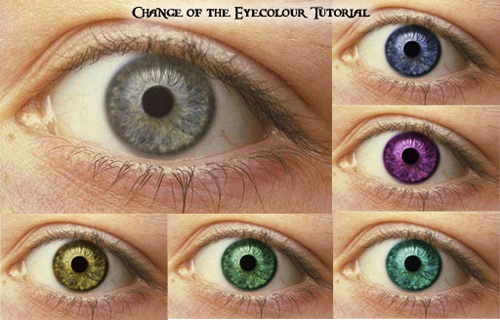
Learn how to change eye color:
Use Photobooth to take a picture of your eyes.  Follow along with this changing eye color video to change the color of your eyes.  Then, find a photo online and do the same thing with the eyes and hair. Upload a before and after of both images (your eyes and the photo you find online).

Adv. Graphic Design:
Work on Halloween image or Anti-Bullying poster:  13 x 19 inches, 300 dpi, make it unique, creative, but NOT humorous.  This is a serious matter, it deserves a serious approach.  The best two (or three or four) will be printed full size and posted around the school.  Don't know yet who will determine "the best," probably Mrs. Haecker and/or Mr. Burks.

Digital Graphics
Follow this link.

Tuesday, 10/2/12

Graphic Design:  Note:  because of absences, I've decided that we will hold the postcard judging on Friday.

Learn how to change the color of a shirt by watching these two videos (one, two) and using this image.

Adv. Graphic Design:  
  1. Your Halloween project is due the 12th.  (More inspiration here.)
  2. Be thinking of your next big assignment:  Anti-bullying poster.  The best posters will be printed and posted around the school!  More details to come, but if you are already finished with the Halloween assignment, you can begin your poster now, just make sure you start with a 13 x 19 inch, 300 dpi file.

Digital Media: 
Finish reviews.
Check to see if your class has scanning.

Monday, 10/1/12


Shortcut of the day:  Command D (to deselect)

Graphic Design:  More Options when it comes to Selections
Using your own image, follow these three tutorials.  Upload your finished image.

Adv. Graphic Design:  What are you working on?  Remember to post to your blog when you start an assignment:  what it's called, what you'll be learning, and when you expect to be finished.
Announcement:  New Photoshop Creative is in!  

Digital Media: 

  1. Download the following apps according to your class period.
  2. Summarize each app in one to two sentences.  Please don't copy what someone else has written, that's called plagiarism.
  3. Write the pros and cons of each game.  You don't have to decided which is best, because in some cases the games are completely different.
  4. Post to your blog the same way you've done the other apps, with at least 3 screenshots.

2nd (J and J only)
Diner Dash
Diner Dash: Boom

4th
VNurse Lite
Anatomy Browser

5th:
Avenue Flo
Big Business HD

6th
Hotel Dash
Hotel Dash: Suite Success

7th
Kids Anatomy Puzzle Lite, 
Speed Anatomy